suppressWarnings(library(sqldf))Loading required package: gsubfnLoading required package: prototcltk DLL is linked to '/opt/X11/lib/libX11.6.dylib'Could not load tcltk. Will use slower R code instead.Loading required package: RSQLiteData often arrives from multiple sources. Organizing data from multiple sources begins by reading the data from each source into a data frame.
After the merge, data for each row are joined by any existing data in the two data frames with the same row ID.
This document shows how to merge two data frames with R and Python/Pandas functions, including functions that provide direct SQL access. To further illustrate the application of SQL operations from R and Python/Pandas, some brief illustrations of subsetting a data frame with SQL are also shown.
To do SQL operations within R, we use the sqldf() function from the library of the same name. Retrieving the package from the R library generates a warning we can ignore.
suppressWarnings(library(sqldf))Loading required package: gsubfnLoading required package: prototcltk DLL is linked to '/opt/X11/lib/libX11.6.dylib'Could not load tcltk. Will use slower R code instead.Loading required package: RSQLiteFor Python, as always for data manipulation, we need Pandas. The pandasql package contains the Python version of the sqldf() function for direct SQL access. The pandasql package is not part of the Anaconda distribution, so separately install.
conda install pandasqlRun this instruction from the command line, as we did previously with the pyarrow package, such as from the Macintosh Terminal App. Or access the command line from Anaconda Navigator: Choose Environments, then base (root), then Open Terminal.
import pandas as pd
import pandasql as psqlTo illustrate merging, create two small data frames, named d1 and d2 for R and df1 and df2 for Python. Each created data frame contains a single variable plus a shared ID field. The variable name for the d1 or df1 data frame is x. For data frame d2 and df2, the variable is y.
Seven records total distributed unevenly across the two data frames. Each data frame contains some records without a corresponding ID in the other data frame. The first data frame is missing records for ID’s 3 and 7. The second data frame is missing records for ID’s 2 and 5.
Define a named vector for each variable, then combine the variables into a data frame with the Base R function data.frame().
d1 <- data.frame(ID=c(1,2,4,5,6), x=c(9,12,14,21,8))
d1
ID x
1 1 9
2 2 12
3 4 14
4 5 21
5 6 8d2 <- data.frame(ID=c(1,3,4,6,7), y=c(8,14,19,2,11))
d2 ID y
1 1 8
2 3 14
3 4 19
4 6 2
5 7 11Use a Python dictionary entry to specify each variable and its constituent data values, then combine the variables into a data frame with the Pandas function DataFrame().
df1 = pd.DataFrame({'ID': [1, 2, 4, 5, 6], 'x': [9, 12, 14, 21, 8]})
df1 ID x
0 1 9
1 2 12
2 4 14
3 5 21
4 6 8df2 = pd.DataFrame({'ID': [1,3,4,6,7], 'y': [8,14,19,2,11]})
df2 ID y
0 1 8
1 3 14
2 4 19
3 6 2
4 7 11Merge (or join) data frames according to an ID field with common values in both data frames. A primary issue in merging data frames is when not all records (rows of data) have a matching ID across both data frames. Merging data frames with records not common to both data frames leads to four distinct possibilities to merge the data frames. Joining data frames can be more complex than the following examples, but these examples are the starting point, and represent the majority of joins.
The Base R function for joining data frames is merge(). The first two parameter values of merge() are the two respective data frames to join. The first data frame listed is the left data frame, named parameter x. The second data frame is the right data frame, named parameter y. Reference the common ID field to join the data frames with the parameter by. Specify different types of join with some version of the all parameter, as shown below.
Use the function sqldf() from the sqldf package to implement SQL statements on data frames. Enclose the sequence of SQL instructions in quotes. Only inner joins and left joins are supported.
The Pandas function merge() merges two data frames. The essential parameters are on to indicate the common variable in both data frames on which to base the merge, and how to specify the type of merge. Valid values for how include outer, inner, right, and left.
To do SQL merges and queries in Python, use the sqldf() function from the pandasql package (module).
  ID  x
1  1  9
2  2 12
3  4 14
4  5 21
5 6 8 ID y
1 1 8
2 3 14
3 4 19
4 6 2
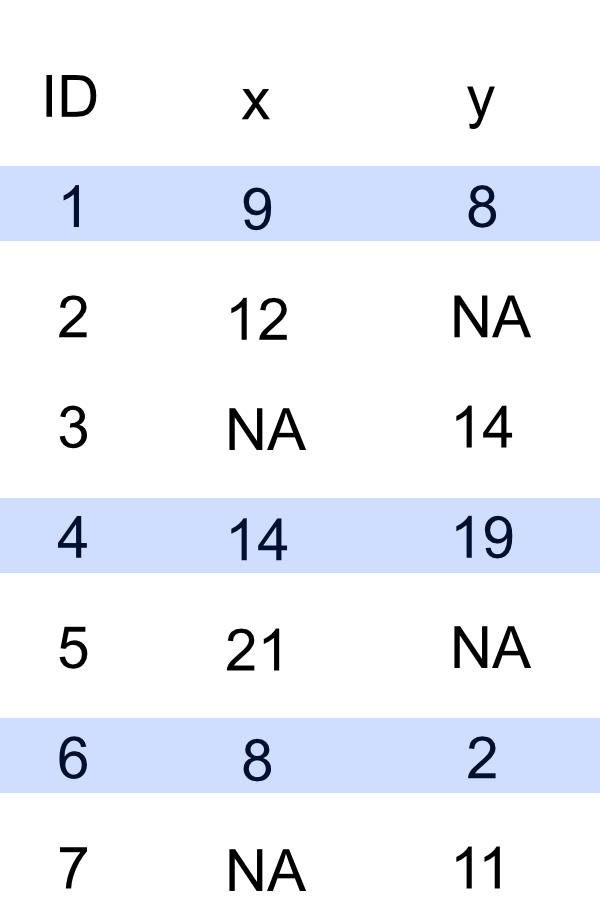
5 7 11Only three rows contain data values for both variables, x and y, Rows 1, 4, and 6. The merged inner join data frame contains only those three rows.
The default for merge() is the inner join. Just specify the data frames and the by variable. In this example, to be explicit, set the all parameter to FALSE, its default value. The value of FALSE means that we do not want all the records from the left data frame nor from the right data frame.
merge(d1, d2, by="ID", all=FALSE) ID x y
1 1 9 8
2 4 14 19
3 6 8 2The sqldf() function provides for an inner join with SQL syntax. The d1.ID reference is to the ID field in the d1 data frame, the common column of data values shared by both data frames. Same for the d2 data frame, d2.ID.
sqldf("select * from d1
inner join d2 on d1.ID = d2.ID"
) ID x ID y
1 1 9 1 8
2 4 14 4 19
3 6 8 6 2The variables from the two data frames by which to merge need not have the same name. However, even if the two names are identical in the two data frames, the SQL inner join still displays the ID field from both, in this case, the same ID field.
To remove the redundant reference, save the selected data frame, then use the Base R subset() to delete the second ID reference, here in the third column. Reference the column with the select parameter. The minus sign in front of the column index means delete.
inner <- sqldf("select * from d1
inner join d2 on d1.ID = d2.ID"
)
inner <- subset(inner, select=-3)
inner ID x y
1 1 9 8
2 4 14 19
3 6 8 2pd.merge(df1, df2, on='ID', how='inner') ID x y
0 1 9 8
1 4 14 19
2 6 8 2The pandasql function sqldf() performs the Python SQL inner join. The function requires the location of the data frames. In this example, the data frames are in the local environment, identified with the locals() function. This is different from R’s sqldf(), which automatically accesses your R environment.
To use sqldf(), define the SQL instruction separately to enhance readability. The """ defines a multi-line string in Python to make the code more readable.
join = """
select * from df1
inner join df2 on df1.id = df2.id
"""
psql.sqldf(join, locals()) ID x ID y
0 1 9 1 8
1 4 14 4 19
2 6 8 6 2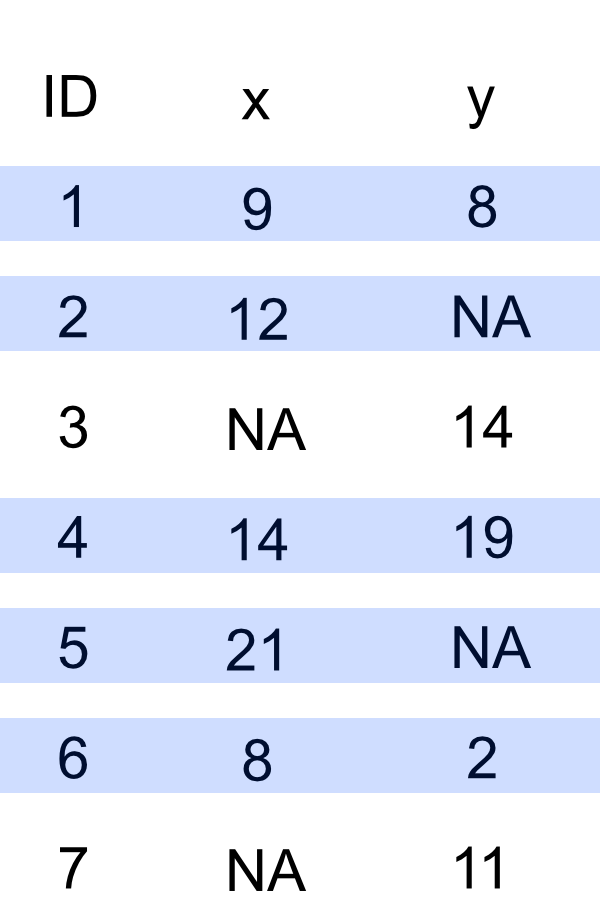
  ID  x
1  1  9
2  2 12
3  4 14
4  5 21
5  6  8
ID y
1 1 8
2 3 14
3 4 19
4 6 2
5 7 11The left data frame, X, has ID records 1, 2, 4, 5, and 6. All of those records are included in the merged data frame. Only those records from the Y data frame are included if the value of the variable x is not missing.
To indicate to include all values from the X or left data frame, but do not include records with a missing value from the Y or right data frame, the merge() function has the all.x parameter. Set the all.x parameter to TRUE. By default, the corresponding all.y parameter, and the all and all.x parmeters, are all set to FALSE.
merge(d1, d2, by="ID", all.x=TRUE) ID x y
1 1 9 8
2 2 12 NA
3 4 14 19
4 5 21 NA
5 6 8 2The sqldf() function does provide for a left outer join with SQL syntax. The d1.ID and the d2.ID refers to the common columns in the two data bases that provide the basis for the merge.
sqldf("select * from d1
left join d2 on d1.ID = d2.ID"
) ID x ID y
1 1 9 1 8
2 2 12 NA NA
3 4 14 4 19
4 5 21 NA NA
5 6 8 6 2Again, remove the third column of the constructed data frame to avoid duplicating the variable ID.
left <- sqldf("select * from d1
left join d2 on d1.ID = d2.ID"
)
left <- subset(left, select=-3)
left ID x y
1 1 9 8
2 2 12 NA
3 4 14 19
4 5 21 NA
5 6 8 2pd.merge(df1, df2, on='ID', how='left') ID x y
0 1 9 8.0
1 2 12 NaN
2 4 14 19.0
3 5 21 NaN
4 6 8 2.0join = """
select *
from df1
left outer join df2 on df1.id = df2.id
"""
psql.sqldf(join, locals()) ID x ID y
0 1 9 1.0 8.0
1 2 12 NaN NaN
2 4 14 4.0 19.0
3 5 21 NaN NaN
4 6 8 6.0 2.0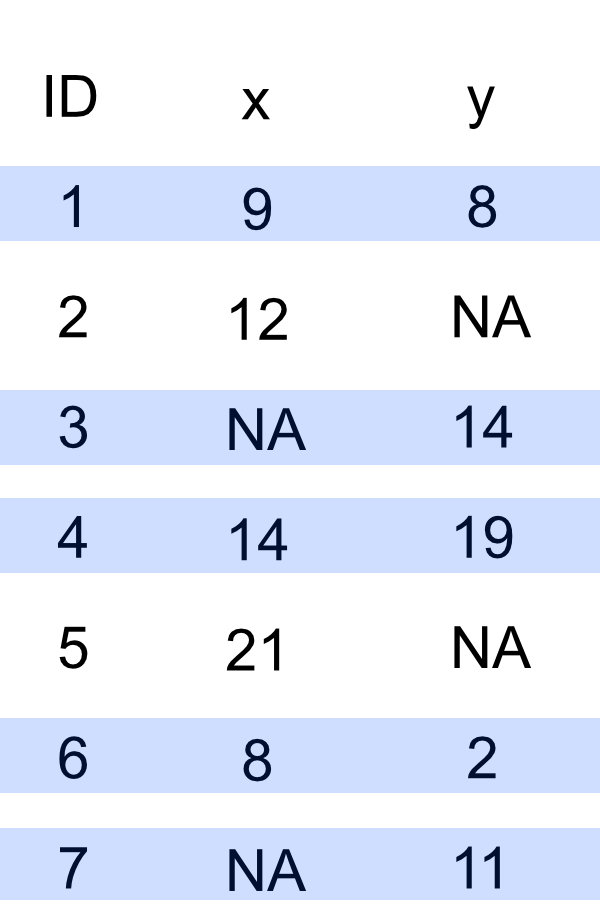
  ID  x
1  1  9
2  2 12
3  4 14
4  5 21
5  6  8
ID y
1 1 8
2 3 14
3 4 19
4 6 2
5 7 11The right data frame, d2, has ID records 1, 3, 4, 6, and 7. All of those records are included in the merged data frame. Only those records from the X data frame are included if the value of d1 is not missing.
To indicate to include all values from the Y or right data frame, but do not include records with a missing value from the X or left data frame, set the all.y parameter to TRUE.
merge(d1, d2, by="ID", all.y=TRUE) ID x y
1 1 9 8
2 3 NA 14
3 4 14 19
4 6 8 2
5 7 NA 11For the SQL right outer join we again have two ID fields in the merged data frame.
right <- sqldf("select * from d1
right join d2 on d1.ID = d2.ID"
)
right ID x ID y
1 1 9 1 8
2 4 14 4 19
3 6 8 6 2
4 NA NA 3 14
5 NA NA 7 11Delete the first column because it is the incomplete ID field.
right <- subset(right, select=-1)
right x ID y
1 9 1 8
2 14 4 19
3 8 6 2
4 NA 3 14
5 NA 7 11We have the functionality we want with only a single ID field. More elegantly, we would also rearrange the variables in the data frame to list the ID as the first column, or even make the ID field a row name.
pd.merge(df1, df2, on='ID', how='right') ID x y
0 1 9.0 8
1 3 NaN 14
2 4 14.0 19
3 6 8.0 2
4 7 NaN 11join = """
select * from df1
right outer join df2 on df1.id = df2.id
"""
psql.sqldf(join, locals()) ID x ID y
0 1.0 9.0 1 8
1 4.0 14.0 4 19
2 6.0 8.0 6 2
3 NaN NaN 3 14
4 NaN NaN 7 11Again, we would delete the first column to retain only a single, fully formed, ID column.
  ID  x
1  1  9
2  2 12
3  4 14
4  5 21
5  6  8
ID y
1 1 8
2 3 14
3 4 19
4 6 2
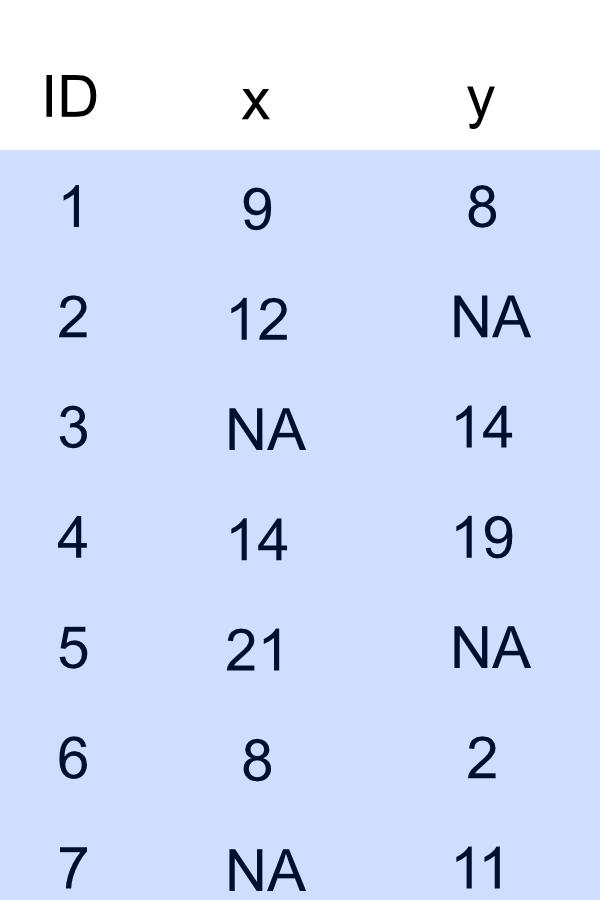
5 7 11The full outer join merged data frame contains all seven records with unique ID’s across both data frames to merge. Because several records in data frames d1 and d2 do not have matching ID’s in the other data data frame, the result of a full outer join contains missing data for both variables, x and y.
To indicate to include all records from both data frames, set the all parameter to TRUE. Or, set both all.x and all.y to TRUE.
merge(d1, d2, by="ID", all=TRUE) ID x y
1 1 9 8
2 2 12 NA
3 3 NA 14
4 4 14 19
5 5 21 NA
6 6 8 2
7 7 NA 11By default, sqldf() accesses the SQLite data base to implement its data base operations, which does not directly support full outer joins.
pd.merge(df1, df2, on='ID', how='outer') ID x y
0 1 9.0 8.0
1 2 12.0 NaN
2 4 14.0 19.0
3 5 21.0 NaN
4 6 8.0 2.0
5 3 NaN 14.0
6 7 NaN 11.0By default, sqldf() accesses the SQLite data base, which does not directly support full outer joins.
Two additional data frames, d3 and df3, are created with a different name of the ID variable to illustrate how to merge two data frames on a common column of identification values with different names. These data frames use the name Identify for the ID variable.
Create R and Python data frames with a different name for the common variable on which the merging is based.
d3 <- data.frame(Identify=c(1,3,4,6,7), y=c(8,14,19,2,11))
d3
Identify y
1 1 8
2 3 14
3 4 19
4 6 2
5 7 11df3 = pd.DataFrame({'Identify': [1,3,4,6,7], 'y': [8,14,19,2,11]})
df3 Identify y
0 1 8
1 3 14
2 4 19
3 6 2
4 7 11If the by variable, the common column of data values across the two data frames, is named differently in the two data frames, then apply the by.x and by.y parameters, where x refers to the first or left data frame, d1 here, and y refers to the second listed data frame, d3 in this example.
merge(d1, d3, by.x="ID", by.y="Identify", all=FALSE) ID x y
1 1 9 8
2 4 14 19
3 6 8 2If the on variable, the common column of data values across the two data frames, is named differently in the two data frames, then invoke the left_on and right_on parameters, where left_on refers to the first or left data frame, df1 here, and right_on refers to the second listed data frame, df3 in this example.
pd.merge(df1, df3, left_on='ID', right_on='Identify', how='inner') ID x Identify y
0 1 9 1 8
1 4 14 4 19
2 6 8 6 2Accessing SQL via R or Python is, of course, not limited to merges. Following are query examples, another way to subset a data frame. In these example, select all Women employees with Years of employment more than 8.
suppressMessages(library(lessR))
d <- Read("Employee", quiet=TRUE)head(d) Years Gender Dept Salary JobSat Plan Pre Post
Ritchie, Darnell 7 M ADMN 53788.26 med 1 82 92
Wu, James NA M SALE 94494.58 low 1 62 74
Downs, Deborah 7 W FINC 57139.90 high 2 90 86
Hoang, Binh 15 M SALE 111074.86 low 3 96 97
Jones, Alissa 5 W <NA> 53772.58 <NA> 1 65 62
Afshari, Anbar 6 W ADMN 69441.93 high 2 100 100d2 <- sqldf("SELECT * FROM d WHERE Gender = 'W' AND Years > 8")
d2 Years Gender Dept Salary JobSat Plan Pre Post
1 9 W ACCT 71084.02 med 2 60 61
2 10 W SALE 66337.83 med 1 67 72
3 10 W SALE 92681.19 med 2 74 71
4 18 W MKTG 91352.33 med 2 63 61
5 18 W ADMN 122563.38 low 3 70 70
6 10 W MKTG 61961.29 high 2 80 86There is a difference of opinion if SQL keywords should be upper-case or lower-case. The language itself does not care. To illustrate the competing styles, in this section I capitalized the keywords. Previous examples presented all words in lower case.
We have read the Employee data into the R data frame d. We could go to the web and read the Employee data table into a Python data frame but easier to simply convert from an R data frame to a Pandas data frame. To convert, the reticulate library provides the functionality to assign the R data frame to a Python data frame with =. To inform Python know the R data frame is from R, add r. in front of the R data frame name.
df3 = r.d
df3.head()
Years Gender Dept Salary JobSat Plan Pre Post
Ritchie, Darnell 7 M ADMN 53788.26 med 1 82 92
Wu, James -2147483648 M SALE 94494.58 low 1 62 74
Downs, Deborah 7 W FINC 57139.90 high 2 90 86
Hoang, Binh 15 M SALE 111074.86 low 3 96 97
Jones, Alissa 5 W None 53772.58 None 1 65 62It appears that the conversion from an R data frame to a Pandas data frame has difficulty with numerical missing data. In this example, pass your query as a string to pandasql.sqldf() to enhance readability. The Years employed for James Wu is missing, as shown from the original R read, but has a very large negative integer value for the Pandas conversion.
In following example, to enhance readability, pass the SQL query as a string to pandasql.sqldf().
query = "SELECT * FROM df3 WHERE Gender = 'W' AND Years > 8"
result = psql.sqldf(query, locals())
result
Years Gender Dept Salary JobSat Plan Pre Post
0 9 W ACCT 71084.02 med 2 60 61
1 10 W SALE 66337.83 med 1 67 72
2 10 W SALE 92681.19 med 2 74 71
3 18 W MKTG 91352.33 med 2 63 61
4 18 W ADMN 122563.38 low 3 70 70
5 10 W MKTG 61961.29 high 2 80 86